How to Buy a Domain for Your Online Store in Egypt 2026 (Easy Orders · Zaatiq · WordPress) — Pay in EGP
Hosting & Domains 07 Jul 2026

How to Buy a Domain for Your Online Store in Egypt 2026 (Easy Orders · Zaatiq · WordPress) — Pay in EGP

Whether you build your store on Easy Orders or Zaatiq, your site on WordPress, or even with AI tools — every path leads to the same step: a custom domain in your project's name. This guide answers the questions every store owner in Egypt asks: Where do I buy the domain? How do I pay without an international card? And how do I connect it to my platform? Step by step.

⚡ Quick Summary — How to Get a Domain for Your Store in Egypt?

Pick a short, clear name (.com is best), buy it from an Egyptian provider that accepts local payment (Vodafone Cash/InstaPay) like IT Plus with no international card, then connect it to your platform by adding the DNS records it asks for (from your DNS management). Connecting differs slightly by platform — but the idea is the same: copy the records the platform shows you and add them in your DNS manager. Start by searching for your domain name.

First: Choosing the Right Domain Name

  • Short and easy to pronounce — customers sometimes type it by hand.
  • .com first if available — the most trusted and memorable. Good alternatives: .net, .store, or .shop for stores.
  • Avoid hyphens and numbers as much as possible — they make it harder to say and remember.
  • Keep it close to your brand name for consistency across store, social, and ads.
  • Try now: search for your name here — instant results.

Second: Buying and Paying in EGP (No International Card)

The known problem: global sites (GoDaddy · Namecheap) require an international card in USD. At IT Plus you pay in Egyptian pounds via:

  • Vodafone Cash 📱
  • InstaPay 🏦

No Visa or Mastercard, no "virtual card," no coupons or complications. You transfer, send the receipt, and confirmation is quick.

Prices are fixed and transparent: .com at $10.85/year (in EGP equivalent) — same price to renew. Compare that to sites that sell you a cheap first year then renew at double.

Third: Connecting the Domain to Your Platform — Based on What You Use

Every platform gives you DNS records, and you add them from DNS Management in your account with us. Here's how, by platform:

🛒 Easy Orders / Zaatiq (ready-made stores)

  1. In store settings: add the custom domain (without www).
  2. Copy the DNS records the platform requests (usually A + CNAME).
  3. Add them in your DNS management, and wait for propagation (minutes to hours). ➡️ Full step-by-step: How to connect a domain on Easy Orders

🤖 Lovable / Vercel / Bolt (AI website builders)

  1. In project settings: Domains → add your domain.
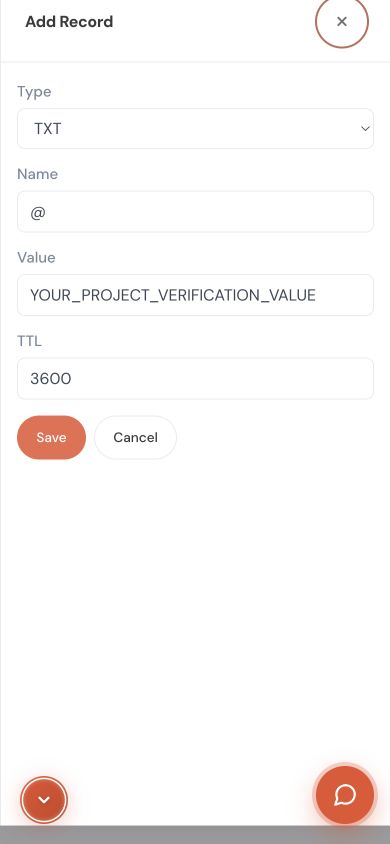
  2. Add the required records (A + TXT verification) from our DNS management, or change nameservers if the platform asks.
  3. Click Verify in the platform — done, and SSL is issued automatically. ➡️ Full guide: How to buy and connect a domain for a Lovable site

📝 WordPress / Full Hosting

  • If you host with us: order hosting with the domain and automatic connection.
  • If your hosting is external: change the nameservers from your domain page with us to your host's nameservers — one minute.
🧭 The detailed per-platform guide in one place: domain connection page.

Common Mistakes When Connecting a Domain (Beware)

  • Copying the record wrong — copy the value literally as the platform shows it (no extra spaces).
  • Forgetting the verification (TXT) record on platforms that require it (like Lovable) — the domain stays unverified.
  • Judging too early before propagation — DNS takes time (minutes to hours).
  • Choosing an extension cheap in year one but expensive to renew — check the renewal price.

Frequently Asked Questions (FAQ)

1. Where do I buy a store domain and pay in EGP? From an Egyptian provider that accepts local payment like IT Plus — via Vodafone Cash or InstaPay, with no international card.

2. How long does connecting take? Adding the records takes minutes; propagation is usually minutes to a few hours (max 24–48 hours, up to 72 in some cases).

3. Do I have full DNS control? Yes — free full management (A / CNAME / TXT / MX) from your account, useful for company email or verification tools.

4. Who owns the domain? You own it 100% — registered in your name, transferable anytime with no restrictions.

5. Which extension should I choose for my store? .com first if available (most trusted). Alternatives: .store, .shop, or .net.

6. Need email on the domain name? Available — company email works on the same domain (like info@yourstore.com).

📚 Read Also from the IT PLUS Blog

📌 Key Takeaways

  • A successful store = a custom name + easy payment + hassle-free connection.
  • Pick a short name and .com if available; avoid numbers and hyphens.
  • Pay in EGP (Vodafone Cash/InstaPay) — no international card, at a fixed renewal price.
  • Connecting is the same idea on every platform: copy the platform's records into DNS management.
  • The domain is yours and works with any platform (store · AI site · WordPress).

Conclusion and Your Next Step

Whatever your platform, a custom domain is what turns your project from an "experiment" into a "brand." Choose your name, pay in EGP without hassle, and connect it to your platform in minutes.

Start here: Buy your domain and pay in EGP 🚀 — and if you need help connecting to any platform, contact the IT PLUS team and we'll set it up for you step by step.

✍️ About the Author

The IT PLUS Technical Team — a team of developers and hosting & domain specialists at IT PLUS, a software and tech-solutions company in Egypt since 2013. We help store owners and businesses buy and connect their domains, hosting, and email in Egyptian pounds with full Arabic support.

Leave a Comment

Comments (0)

No comments yet. Be the first to comment!