Domain Not Working? Find the Cause and Fix It
A domain that does not open after setup does not always need more waiting. First confirm the records are correct and were added in the right place, then check p…
0Like
 26Views
You can use company email such as info@example.com while keeping your website on its current platform. Set up the email records while preserving the website records.
Choose the mailbox count for your team and check storage and billing term. A monthly equivalent does not mean monthly payment: review the stated term and upfront total. Eligible plans include a free domain on terms of at least one year, subject to the offer conditions.
Open the account where you registered your domain, then its Nameservers settings. These identify the provider that manages your website and email records. If IT PLUS manages those records, open your account → Domains → your domain → DNS management. If another provider manages them, add the records there. If you are unsure, ask support to check your domain before changing anything.
If an external provider manages your records, you or your domain administrator must add them there. IT PLUS shows the required values. Where automatic setup is available, check its result in the dashboard. Registration with IT PLUS alone does not prove we currently manage all your DNS settings.
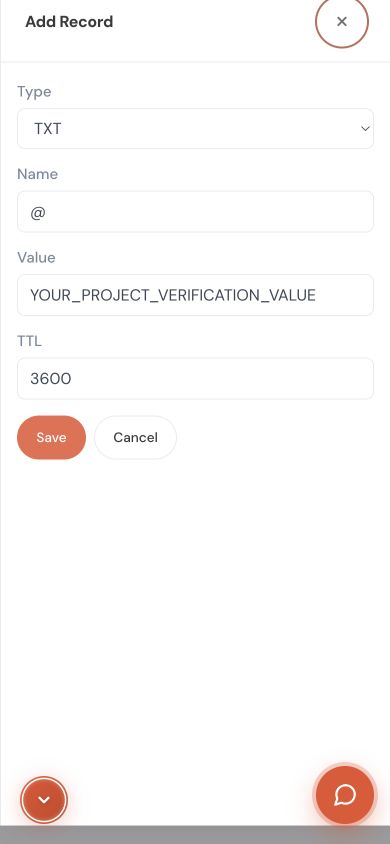
Keep existing email records. Do not delete all records or replace nameservers just to connect a website. Copy values from your own project; do not reuse a server address from an article or another customer’s project.
Use mail migration to copy messages from your old provider. Duration depends on mailbox size and connection speed. Keep the old service until you verify the copy and test sending and receiving; starting migration is not a reason to cancel it.
Choose the billing term before comparing plans. The prominent amount is the total for that term; longer terms may also show a monthly equivalent. A new domain or extra services can add charges shown before payment.
Compare email plans with monthly billing
Open Mail Health to check the setup. Passing these checks helps diagnosis but does not guarantee inbox placement. Share the error, test time and relevant sender and recipient details with support when needed, never passwords.
MX identifies the receiving mail server. SPF, DKIM and DMARC help recipients authenticate the sender. Do not create a second SPF record; have the required settings merged. Do not change the website’s A record to route email.
Google Workspace is more than email: it bundles Drive, Docs, Meet and pooled storage per user, and it is priced per user, varying by country and commitment. Our email plans are email only: a plan price covers a set number of mailboxes, and each plan states the storage per mailbox.
Our per-mailbox price is in the price block below this guide (read live from the catalogue, in your currency); Google’s is on its official pricing page.
Written and reviewed by IT PLUS — October 2026.
How do I get email on my company domain at the lowest cost?
Choose a plan with the mailbox count your team actually needs and a billing term that suits you; your website stays where it is. Paying for a longer term usually lowers the monthly equivalent, so compare the total, not only the monthly figure. The current price is in the price block below and on the plans page, in your currency with the payment methods available for your country.
What does one mailbox cost?
The price per mailbox is the plan’s monthly price divided by its mailbox count. We do not write the number here because it changes with prices and exchange rates; the price block below works it out from the current catalogue.
Is there an email-only alternative to Google Workspace?
Yes. An email plan on your domain is enough if you only need email. If your team relies on Docs, Meet and Drive, those tools are not part of an email plan. Compare the current price and mailbox storage before deciding.
Is the email protected from spam and viruses?
Yes: spam filtering on every account, attachment scanning that stops an infected file before it arrives, and SSL/TLS encryption for sending and receiving.
Use an address such as info@example.com. Add the mail records in your domain dashboard. If DNS is managed outside IT PLUS, we show you the values to add there while keeping your website records. Choose the mailbox count and billing term that fit your needs.
$ 5.29 for 3 mailboxes, billed monthly
About $ 1.76 per mailbox per month in this example.
Total for one month: $ 5.29. A lower monthly equivalent may be available when paying for a longer term upfront; check the term and total on the plan page.
Choose your email plan and termStuck on a step? Share your domain name and a screenshot of the problem so we can help.
No comments yet. Be the first to comment!
If your site already runs on a platform such as Lovable or V...
A domain that does not open after setup does not always need...

If you built your site and published it for free on GitHub P...

A domain is your store’s address, such as example.com. If a ...
Explore more articles that might interest you
Leave a Comment