Hosting & Domains 07 Jul 2026
How to Connect a Domain to Your Easy Orders Store Step by Step — and Buy It with Vodafone Cash (2026)
Built your store on Easy Orders and ready to take orders? The step that separates a "trial" store from a "real brand" is your custom domain: instead of yourstore.easy-orders.net, your name becomes yourstore.com. The only thing stopping most merchants in Egypt is that buying a domain from global sites requires an international card in US dollars. In this guide we'll walk you through it step by step: buy your domain in Egyptian pounds (Vodafone Cash / InstaPay) and connect it to your store with zero hassle.
⚡ Quick Summary — How to Connect a Domain on Easy Orders?
Buy a .com domain from an Egyptian provider that accepts local payment (like IT Plus), add the domain in your Easy Orders "custom domain" settings (without www and without http), copy the DNS records the platform shows you (usually an A record for the root + a CNAME for www), add them in your DNS manager, and wait for DNS propagation — from minutes to a few hours. That's it — your store opens on your own name. Want to do this in Egyptian pounds with no international card? Start from the domains page.
Why Does Your Store Need a Custom Domain?
- Customer trust: buyers pay more easily when they see a clear brand name (
yourstore.com), not a free platform link. - Cheaper, stronger ads: landing-page quality in Google and Facebook ads improves with a custom domain, and it looks professional in the ad.
- Permanent ownership: the domain is in your name — if you switch platforms later, your name, customers, and reputation stay with you.
- Email on your name: you can set up an address like
info@yourstore.comon the same domain.
The Problem Egyptian Merchants Face (and the Solution)
Easy Orders tells you plainly: "buy a domain from any provider and connect it." But most global sites (GoDaddy · Namecheap · and others) require an international card in US dollars — a real barrier for most store owners in Egypt.
The solution: buy the domain from an Egyptian provider that accepts Vodafone Cash and InstaPay in Egyptian pounds — no international card, no "virtual card," no coupons. That's exactly what we offer at IT Plus.
Step 1: Buy the Domain and Pay in Egyptian Pounds
- Open the domain search page and type the name you want.
- Choose the extension — we recommend .com ($10.85/year, same price to register and renew — no next-year surprises).
- Add it to the cart and complete the order — you can browse and add without signing in.
- At checkout, switch the currency to EGP and choose Vodafone Cash or InstaPay, then send the receipt — confirmation is quick.
Step 2: Get the Connection Records from Easy Orders
- In your Easy Orders store dashboard, open the custom domain settings.
- Enter your domain without www and without http (example:
yourstore.com). - The platform shows you the required DNS records (usually an A record for the root
@+ a CNAME forwww, and sometimes it asks for root forwarding). Keep the page open and copy the values as-is.
Step 3: Add the Records in Your DNS Manager
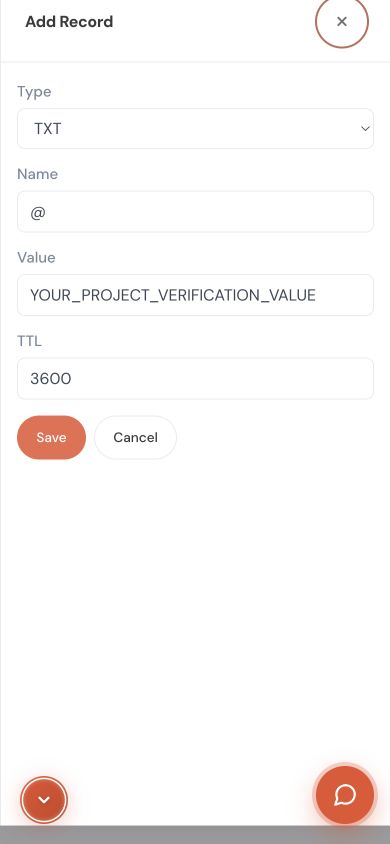
- From your IT Plus account, open the domain page then DNS Management (free and complete: A / CNAME / TXT / MX).
- Add the records you copied from Easy Orders with the exact same values and save.
- Go back to Easy Orders and activate the domain.
Step 4: Wait for Propagation and Test
DNS propagation usually takes from minutes to a few hours (max 24–48 hours). After that, your store opens on your custom domain ✨ — if it only opens on www, go back and make sure the root @ record is correct.
Common Mistakes That Break the Connection (Beware)
- Writing the domain with www or http in the custom-domain field — it must be clean:
yourstore.com. - Copying the record wrong (an extra space or a missing value) — copy it literally as Easy Orders shows it.
- Forgetting the www record or the root record — you need both so the site opens either way.
- Judging too early — if it doesn't open immediately, wait for propagation before you undo and redo.
- Buying an odd extension with a high renewal price — stick to .com or a clear extension with a stable renewal price.
Frequently Asked Questions (FAQ)
1. What's the total cost to connect a domain on Easy Orders? A .com domain is $10.85/year (paid in EGP equivalent) — no hidden fees, and renewal is the same price. The connection itself is free, and DNS management is free.
2. Can I buy and pay without an international card? Yes. At IT Plus you pay in Egyptian pounds via Vodafone Cash or InstaPay — no international bank card.
3. How long does the connection take? Adding the records takes minutes, and DNS propagation is usually from minutes to a few hours (max 24–48 hours).
4. Do I own the domain? Yes, it's fully registered in your name and you can transfer it anytime with no restrictions.
5. What if I get stuck on the records step? Arabic support is with you via WhatsApp or tickets — we help you set the records for Easy Orders or any other platform.
6. Can I create an email on the domain name? Yes — company email works on the same domain (like info@yourstore.com).
📚 Read Also from the IT PLUS Blog
- A Guide to Buying a Domain for Your Online Store in Egypt (Easy Orders · Zaatiq · WordPress) — the full overview for every platform. (add the link after the pillar article is published)
- How to Buy a Domain for Your Lovable Website from Egypt Without an International Card — if you build with AI. (add the link after it's published)
- Search for your domain name now — instant results.
📌 Key Takeaways
- A custom domain = higher trust + stronger ads + permanent ownership for your Easy Orders store.
- The only obstacle in Egypt = the international card; the solution: buy in EGP (Vodafone Cash/InstaPay).
- Connecting is 4 steps: buy → get the Easy Orders records → add them in DNS management → wait for propagation.
- Copy the records literally (A record for the root + CNAME for www), and the domain without www/http.
- .com at a fixed price to register and renew ($10.85) — avoid extensions whose renewal jumps.
Conclusion and Your Next Step
Connecting a custom domain to your Easy Orders store isn't complicated — the only obstacle was payment, and we solved it in Egyptian pounds. Buy your name, copy the records, add them, and wait for propagation — and your store opens on your real brand.
Ready to start? Buy your domain and connect it to your store — pay in EGP, and if you need help, contact the IT PLUS team and we'll set it up for you step by step.
✍️ About the Author
The IT PLUS Technical Team — a team of developers and hosting & domain specialists at IT PLUS, a software and tech-solutions company in Egypt since 2013. We help merchants and business owners set up their domains, hosting, and email in Egyptian pounds with full Arabic support.
Comments (0)
No comments yet. Be the first to comment!


Leave a Comment