Hosting & Domains 07 Jul 2026
How to Buy and Connect a Domain for Your Lovable Website from Egypt — Without an International Card (2026)
Built your website or app with AI on Lovable in hours? Great — but it's still on a link like yourapp.lovable.app. To make it a real project under your own name, you need a custom domain. The only problem: buying the domain from inside Lovable requires an international card in US dollars, and that's where most users in Egypt get stuck. The solution is simpler than you think: buy the domain from Egypt in Egyptian pounds and connect it to your project in minutes — the full guide is here.
⚡ Quick Summary — How to Connect a Domain on Lovable?
Buy a .com domain from an Egyptian provider that accepts local payment (like IT Plus), in your Lovable project open Settings → Domains → Connect custom domain and enter your domain, Lovable shows you an A record and a TXT verification record — add them in your DNS manager, go back and click Verify, and the SSL certificate is issued automatically. The key point: don't forget the TXT record — it proves ownership and is the most common reason a domain stays unverified. Want to do this in Egyptian pounds with no international card? Start from the domains page.
Why Not Buy the Domain Inside Lovable?
- Payment there is in US dollars and by international card only — not available to most Egyptians.
- The price is usually higher than buying directly from a registrar.
- When you buy it externally, the domain is fully yours and you can use it with any other platform later (not locked to Lovable).
Most importantly: Lovable officially supports connecting an external domain — from project settings, by adding simple DNS records. So you're not doing anything "outside the system"; this is the supported path itself.
Step 1: Buy the Domain in Egyptian Pounds
- Open the domain search page and check name availability.
- Choose .com at $10.85/year — a fixed price to register and renew (no next-year hike).
- Complete the order and pay in EGP via Vodafone Cash or InstaPay — no bank card at all; send the receipt and confirmation is quick.
Step 2: Enable the Custom Domain in Lovable
- In your Lovable project: Settings → Domains → Connect custom domain.
- Enter your domain name.
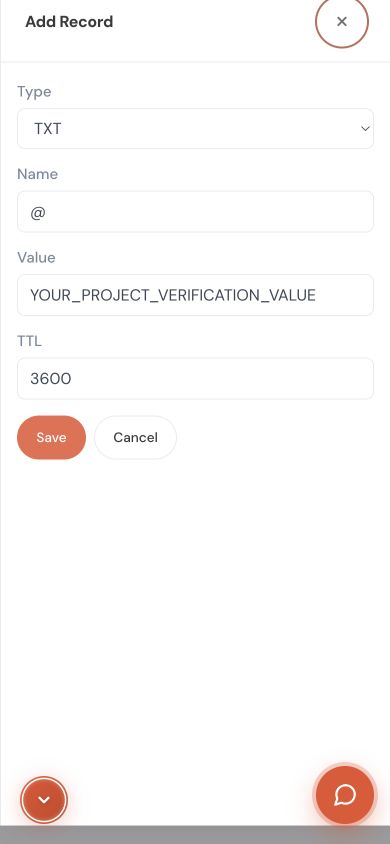
- Lovable shows you two records: an A record (pointing to Lovable's IP) + a TXT record (to verify domain ownership). Keep the page open and copy the values as-is.
Step 3: Add the Records in Your DNS Manager
- From your IT Plus account, open the domain page then DNS Management.
- Add the A record and the TXT record with the exact values Lovable showed, and save.
- ⚠️ Don't forget the TXT record — it proves ownership; skipping it is the most common reason a domain stays "pending / unverified."
Step 4: Click Verify and Wait for SSL
Go back to Lovable and click Verify. Verification usually takes from minutes to a few hours (up to 72 hours depending on DNS propagation). After that, your AI-built site opens on yourname.com — with an automatic SSL certificate from Lovable ✨.
Using Vercel, Bolt, or v0? Exactly the same idea: from project settings (Domains) add your domain, and the platform will ask for an A record or a nameserver change — both done from your domain page with us in a minute.
Common Mistakes That Break the Connection (Beware)
- Forgetting the TXT record ⭐ — the single most common cause; without it the domain stays unverified no matter how long you wait.
- Using Cloudflare? Keep the records on DNS only mode (grey cloud, not orange) during verification and setup.
- Copying the record value wrong (an extra space or missing character) — copy it literally as Lovable shows it.
- Judging too early — if it doesn't open immediately, wait for DNS propagation before you undo and redo.
Frequently Asked Questions (FAQ)
1. Does Lovable allow an external domain? Yes. Lovable officially supports connecting an external custom domain from Settings → Domains, by adding an A record and a TXT verification record.
2. Can I buy the domain from Egypt without an international card? Yes. At IT Plus you pay in Egyptian pounds via Vodafone Cash or InstaPay — no international card.
3. Why is my domain still pending in Lovable? Usually because you added the A record but forgot the TXT record — add it with the exact value, or wait for DNS propagation if it's still early.
4. Will SSL (https) turn on automatically? Yes, Lovable issues an SSL certificate automatically after the domain is verified.
5. Can I move the domain to another platform later? Yes — the domain is fully in your name and transferable to any provider or platform anytime.
6. I also have a project on another platform (a store, for example)? The same domain can connect to any platform — see the per-platform connection guide.
📚 Read Also from the IT PLUS Blog
- A Guide to Buying a Domain for Your Online Store in Egypt (Easy Orders · Zaatiq · WordPress) — the full overview for every platform.
- How to Connect a Domain to Your Easy Orders Store Step by Step — if your store is on Easy Orders.
- Search for your domain name now — instant results.
📌 Key Takeaways
- Lovable officially supports an external domain — no need to buy inside it in USD.
- Buying from Egypt in EGP (Vodafone Cash/InstaPay) solves the international-card barrier.
- You need an A record + a TXT record — and the TXT is the key to verification (don't skip it).
- After Verify, SSL is issued automatically and your site opens on your name.
- The domain is yours and works with any other platform (Vercel/Bolt/store).
Conclusion and Your Next Step
You built your site with AI in hours — don't let a payment obstacle keep you from your own name. Buy your domain from Egypt in EGP, add the A and TXT records, click Verify, and the rest (SSL) sorts itself out.
Ready to start? Buy your domain and connect it to your site — pay in EGP, and if you need help, contact the IT PLUS team and we'll set it up for you step by step.
✍️ About the Author
The IT PLUS Technical Team — a team of developers and hosting & domain specialists at IT PLUS, a software and tech-solutions company in Egypt since 2013. We help builders and developers connect their domains to any platform (Lovable · Vercel · stores · WordPress) in Egyptian pounds with full Arabic support.
Comments (0)
No comments yet. Be the first to comment!


Leave a Comment